
Record video reviews
Record video reviews on your OMR Reviews product profile to showcase authentic customer testimonials and build trust with potential buyers
Create authentic video reviews with ease: a step-by-step guide, smart strategies, and practical tips
Video reviews are a real boost for your OMR Reviews profile! They let potential customers hear directly about your users’ experiences, helping you build trust.
Here’s what you’ll find in this article 👇
-
Why video reviews are so valuable
-
How to add video reviews to your OMR Reviews product profile
-
The right strategy for your video reviews
-
Tips for recording your video reviews
-
Tips for conducting interviews
-
What happens after recording
Why video reviews are so valuable
Video reviews are short video messages from your customers about their experiences with your software. Imagine a potential customer not only reading what someone has written, but also hearing the enthusiasm in their voice, seeing their smile, and getting a direct sense of how authentic the review is.
✅ Build trust: Videos feel more personal and credible than text alone.
✅ Create an emotional connection: Real emotions bring your product to life.
✅ Increase engagement: Videos capture attention and keep viewers watching for longer.
✅ Stand out: Set yourself apart from competitors who only use text reviews.
How to add video reviews to your OMR Reviews product profile
Starting with the Advanced plan, you can add video reviews to your product profile.
-
Advanced plan
You can add one video review directly to your product profile. -
Professional plan
You can feature an unlimited number of video reviews on your product profile.
Adding video reviews to your OMR Reviews product profile is easier than you think! We’ll help you with the process so you can focus on what matters most: building relationships with your customers.
Step-by-step guide: Here’s how it works 👇
1. Get your customers’ consent
Before you start recording, it’s essential to get written consent from the person submitting the review. This is legally required and ensures transparency.
We publish video reviews not only on your OMR Reviews product profile, but also on the OMR Reviews YouTube channel. By signing the consent form, your customers agree to both forms of publication. So always make sure you use the current version of the form. Older versions don’t cover publication on YouTube.
👉 Consent form for video reviews (German)
👉 Consent form for video reviews (English)
2. Record a meaningful, high-quality video review
Record authentic video reviews in which your customers talk about their experiences with your software. Whether at customer events, during interviews for success stories, or in dedicated testimonial recordings, every opportunity is a valuable one for collecting reviews.
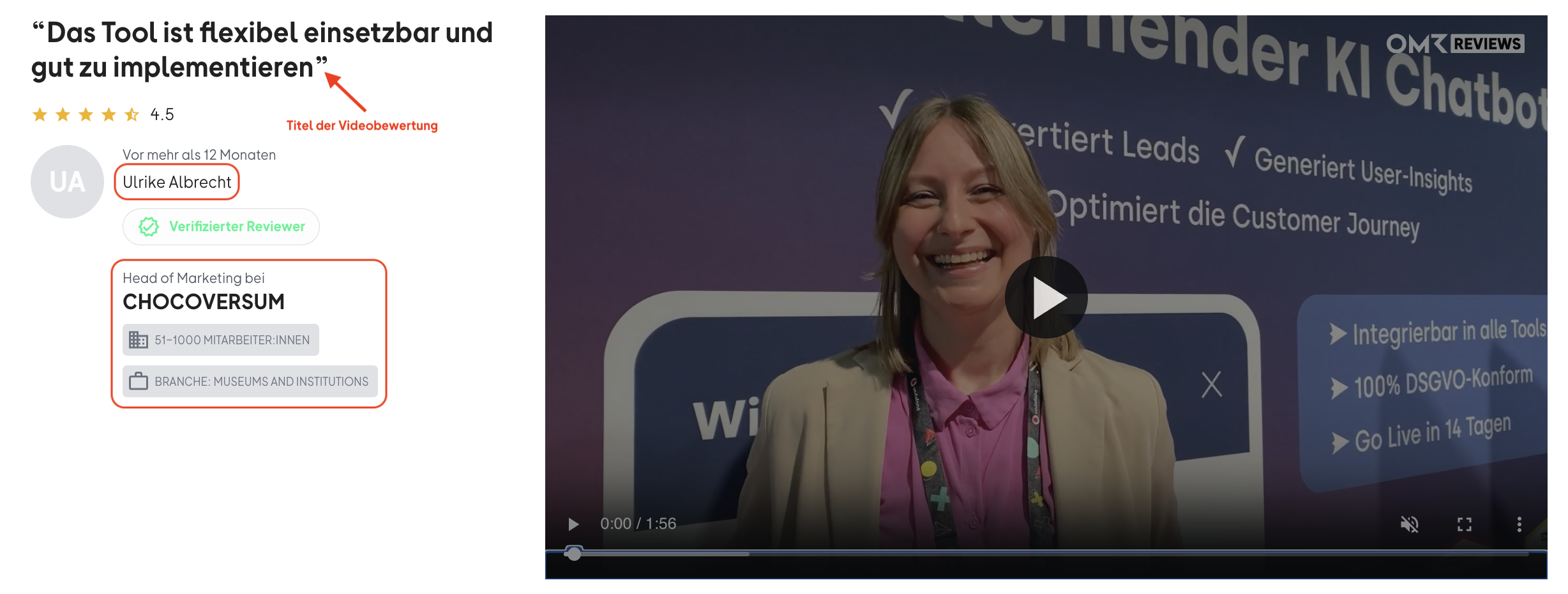
Include the required information about the person submitting each video review. This helps potential customers understand who the review is coming from. They can see whether it was submitted by a company in a similar industry or by someone with a comparable role and perspective.
Collect the following information from your customers:
▶︎ First and last name
▶︎ Role/title
▶︎ Company name
▶︎ Company size
Good to know: Our review survey uses the following employee-size ranges: 0-10, 11-50,
51-100, 101-200, 201-500, 501-1,000 employees.
▶︎ Industry
▶︎ Quote for the review title
Ask for a meaningful statement that can be used as the title of the video review.
-1)
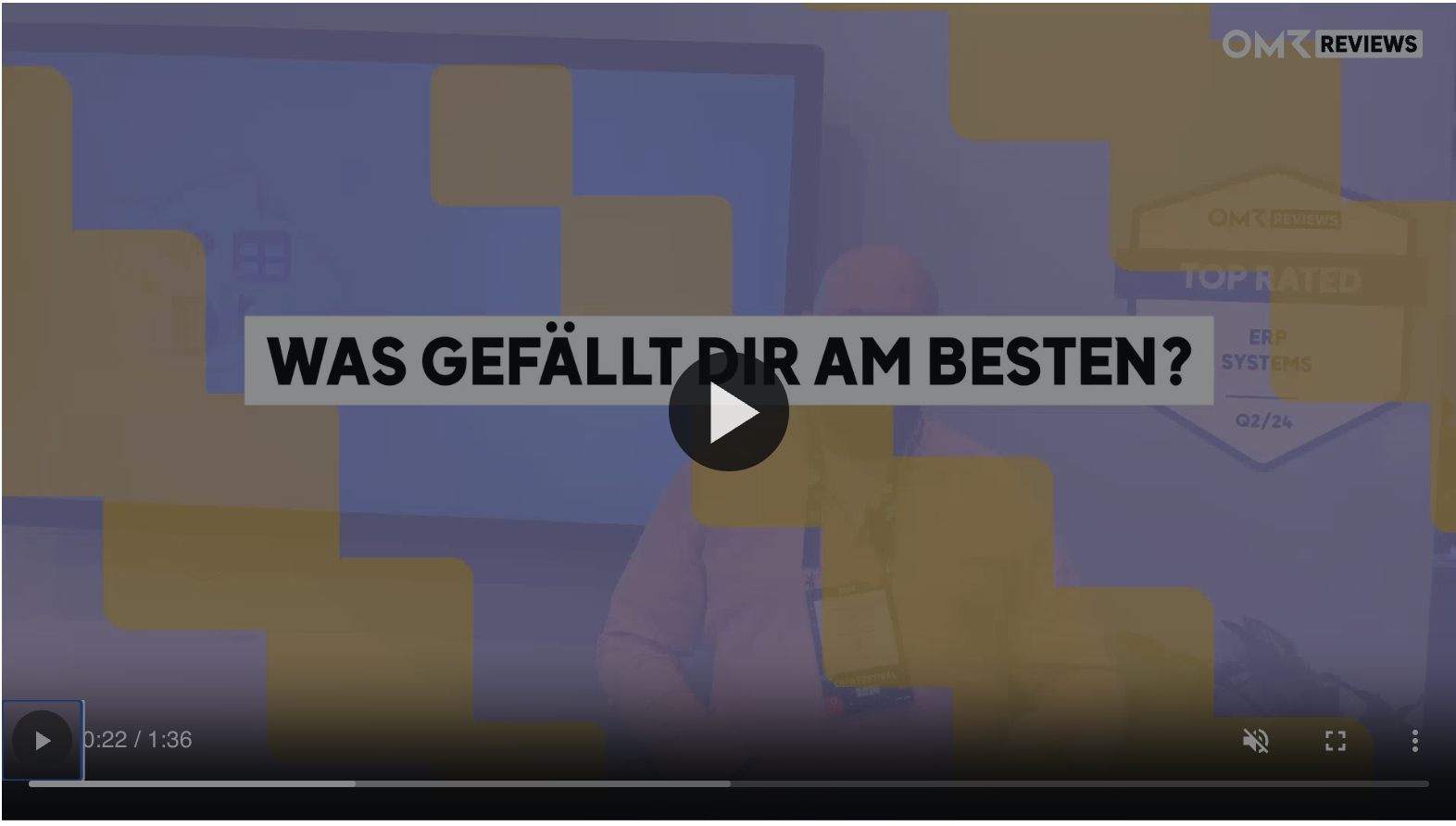
To make sure your video review meets OMR Reviews’ quality standards and can be published without any issues, use the guiding questions below. They’re designed to generate valuable, authentic feedback. We also use these questions to structure video reviews and include them as on-screen overlays.
Guiding questions for video reviews: How to interview your customers
1. What do you like most about our product?
2. What do you like least about our product? Where do you see room for improvement?
3. What business problem or problems does our product solve for you?
4. What advice would you give to others considering our product?
-1)
Use the following materials to record video reviews:
👉 Consent form for video reviews (German)
👉 Consent form for video reviews (English)
👉 Briefing and guiding questions for video reviews (German)
👉 Briefing and guiding questions for video reviews (English)
3. Send us the video file(s)
Once you’ve recorded your video review, please email us the raw files along with the signed consent form at cs-reviews@omr.com.
Our support team will edit the video, add overlays and review questions, and optimize how your video review is presented.
If you’d like to approve the video before it’s published, just let us know in your email. We’ll send you the final version to review. If you don’t request this, we’ll publish the video directly on your product profile.
The right strategy for your video reviews
Before you get the camera out, take some time to plan a clear strategy.
Focus on value
-
Identify your “superfans”
Which customers are especially enthusiastic about your software? Who has achieved the best results? They’re ideal candidates for video reviews. -
Focus on specific use cases
Encourage your customers to share practical details about how they use your software. This makes the videos more relatable and relevant. -
Make room for emotion
Encourage your customers to talk honestly and enthusiastically about their experiences. Authentic emotions always resonate.
Make the most of recording opportunities
-
Customer events
Use conferences, workshops, or partner meetings to conduct short video interviews on site. The atmosphere is often relaxed, and people are usually happy to take part. -
Online interviews
Schedule short video calls with customers. Make sure they have a stable internet connection and a quiet environment.
-
“Success story” interviews
If you’re already interviewing customers for written success stories, ask whether they’d also be happy to record a short video soundbite.
Tips for recording your video reviews
Even though we’ll edit the video for you, a few simple tricks can significantly improve the quality of your video review.
🎙️ Good audio quality
Pay particular attention to audio quality. If possible, use an external microphone. Make sure the environment is quiet and free of distracting background noise.
💡 Good lighting
Make sure the video is well lit with soft light, ideally coming from the front. Avoid backlighting and direct, harsh light. Use a tripod or place the camera on a stable surface to prevent shaky footage. This is essential for creating a professional impression.
🖼️ The right background
Choose an uncluttered background, ideally with your branding or product name subtly displayed where it’s easy to see. This helps people recognize your brand.
📹 Camera angle
Whether you’re sitting or standing, always position the camera at eye level. This creates natural, direct eye contact that feels both professional and relaxed. Also make sure the person is centered in the frame and there’s enough distance between them and the background.
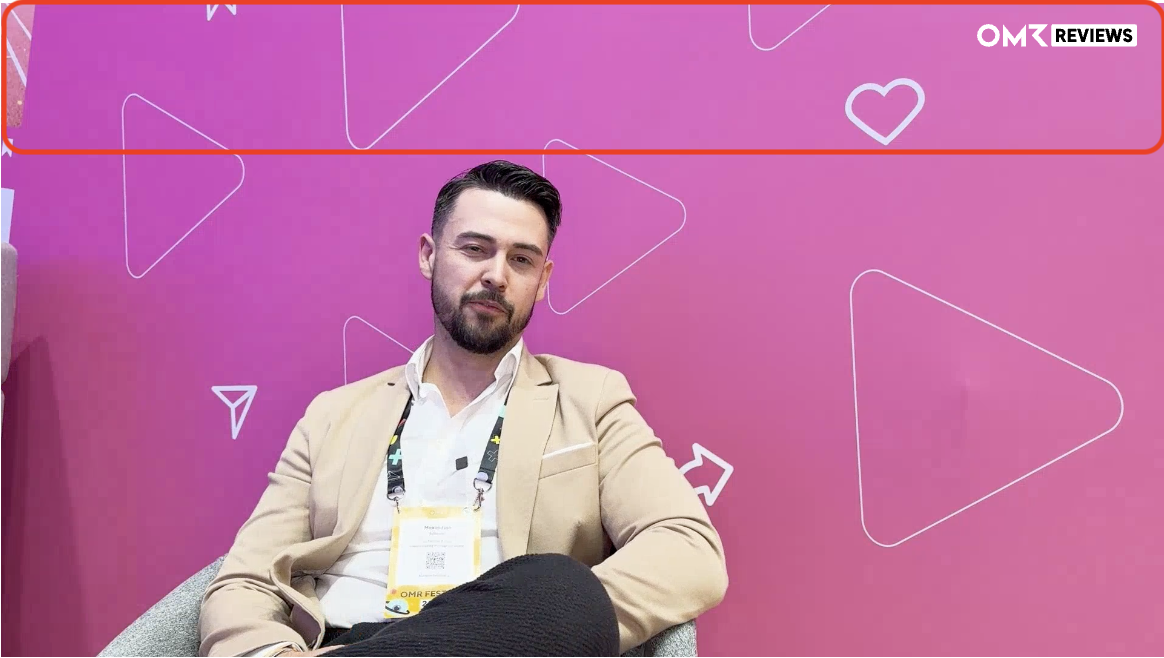
📹 Record in landscape format
Please always record video reviews in landscape format. This leaves enough room in the background for your brand logo and for us to add the questions on screen. Also, leave space in the upper third of the frame, where we’ll place the OMR Reviews logo during editing.
-1)
🎬 Record in segments
Ideally, record the video review in separate segments, one for each question. This creates a more professional result, makes it easier to fix any major stumbles, and simplifies the editing process.
☑️ Our guidelines
Be sure to follow our video review brief. This helps ensure your recordings meet our quality standards and guidelines, making the editing and publication process much easier.
Tips for conducting the interview
🗣️ Ask open-ended questions
Use our required review questions as a guide during your interview:
-
What do you like most about our product?
-
What do you like least about our product? Where do you see room for improvement?
-
What business problem or problems does our product solve for you?
-
What advice would you give to others who are considering our product?
🌟 Encourage authenticity
Create a relaxed, comfortable atmosphere and enjoy conducting the interview. Let the person be themselves. They don’t need to be perfect! Small stumbles or spontaneous moments make the video feel more human and authentic.
What happens after the recording
Once you’ve sent your video files and consent form to our Support team (cs-reviews@omr.com), we’ll take care of the rest:
🔍 Quality check
We’ll check whether the interview and video review comply with our guidelines.
✂️ Video editing
We’ll edit the video, add overlays and the review questions, and optimize how it looks.
🟢 Publication, with or without approval
We’ll publish your video review on your product profile and on the OMR Reviews YouTube channel. We’ll either publish it right away or wait for your approval, depending on whether you let us know when sending the files that we shouldn’t publish it before you’ve approved it.
Video reviews appear at the top of your product profile and on the OMR Reviews YouTube channel (youtube.com/@omrreviews). This helps you reach potential customers in two places.
💡Good to know:
-
Video reviews always appear above the text reviews.
-
Like text reviews, they count toward the relevant quarter and help you earn OMR Reviews badges.
Have more questions? We’re happy to help!
If you have any other questions or concerns, feel free to contact our Support team directly at cs-reviews@omr.com.
 Powered by happysupport.ai