
Recording Video Reviews
Record authentic video reviews from customers on your OMR Reviews product profile to build trust and increase engagement with potential buyers
How to create authentic video reviews with ease: step-by-step guide, smart strategies & practical tips
Video reviews are a real game-changer for your OMR Reviews profile! They let potential customers dive directly into your users' experiences and build trust in the process.
In this article you'll find the following content 👇
-
Why video reviews are so valuable
-
How to integrate video reviews into your OMR Reviews product profile
-
The right strategy for your video reviews
-
Tips for recording your video reviews
-
Tips for conducting interviews
-
What happens after recording
Why video reviews are so valuable
Video reviews are short video messages from your customers in which they talk about their experiences with your software. Imagine a potential customer not just reading what someone wrote, but hearing the enthusiasm in their voice, seeing their smile, and getting a direct impression of how authentic the review really is.
✅ Building trust: Videos feel more personal and credible than plain text.
✅ Emotional connection: Your product becomes tangible through genuine emotions.
✅ Higher engagement rates: Videos capture attention and are consumed for longer.
✅ Differentiation: Stand out from competitors who only use text reviews.
How to integrate video reviews into your OMR Reviews product profile
Starting with the Advanced package, you have the option to integrate video reviews into your product profile.
-
Advanced Package
You can add one video review directly to your product profile. -
Professional Package
You can present unlimited video reviews on your product profile.
Integrating video reviews into your OMR Reviews product profile is easier than you think! We'll support you so you can focus on what really matters: your relationship with your customers.
Step-by-step guide: Here's how it works 👇
1. Get consent from your customers
Before you start recording, it's really important that you get written consent from the person giving the review. This is legally necessary and ensures transparency.
We publish video reviews not only on your OMR Reviews product profile but also on the OMR Reviews YouTube channel. With the consent form, your customers are agreeing to both publication channels. So always refer to the current version of the form. Older versions don't cover YouTube publication.
👉 Consent Form for Video Reviews (German)
👉 Consent Form for Video Reviews (English)
2. Record a meaningful and high-quality video review
Record authentic video reviews from your customers in which they talk about their experiences with your software. Whether at customer events, in interviews for success stories, or targeted testimonial recordings - every opportunity is valuable for collecting these reviews.
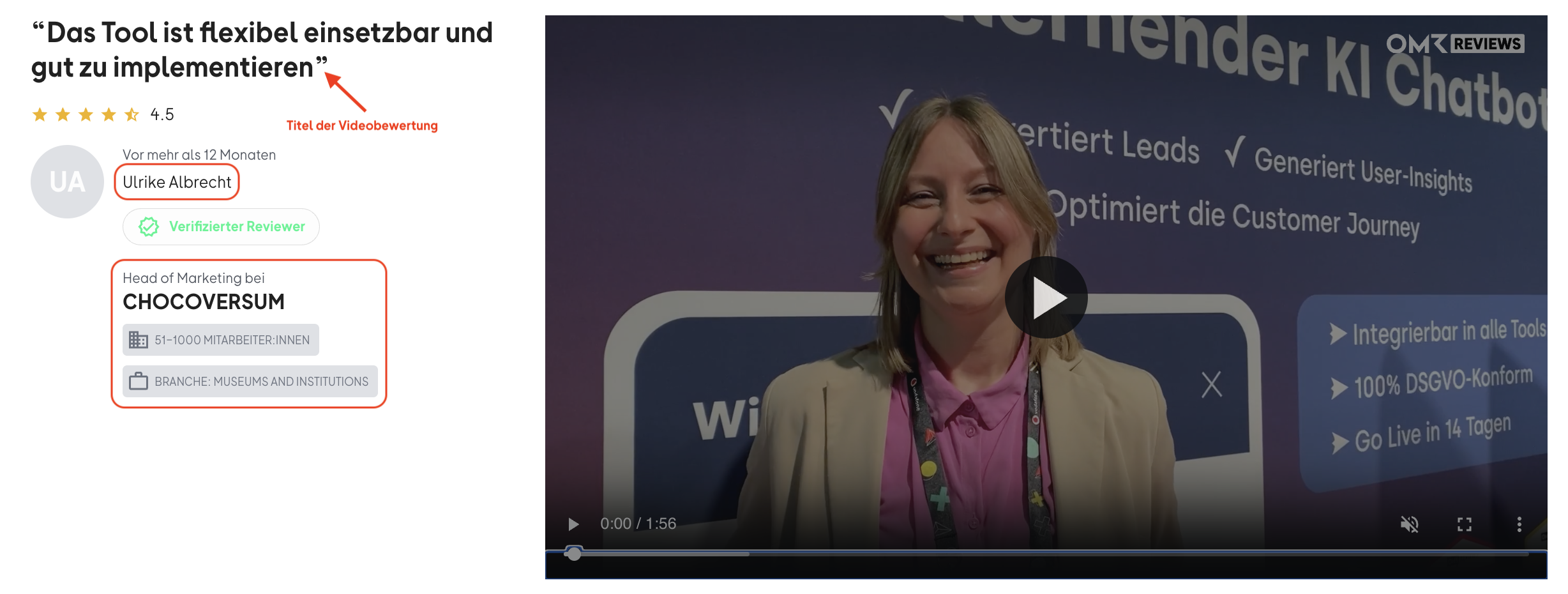
Supplement each video review with the required information about the person giving the review. This helps potential customers get better oriented. They can see whether the review comes from a company in a similar industry or from someone with a comparable role and perspective.
Gather this required information from your customers:
▶︎ First/Last Name
▶︎ Role/Position
▶︎ Company Name
▶︎ Company Size
Good to know: In our review survey, we distinguish between the following sizes: 0-10, 11-50, 51-100, 101-200, 201-500, 501-1,000 employees.
▶︎ Industry
▶︎ Quote for the Review Title
Get a meaningful statement that will be used as the title for the video review.
 -1)
-1)
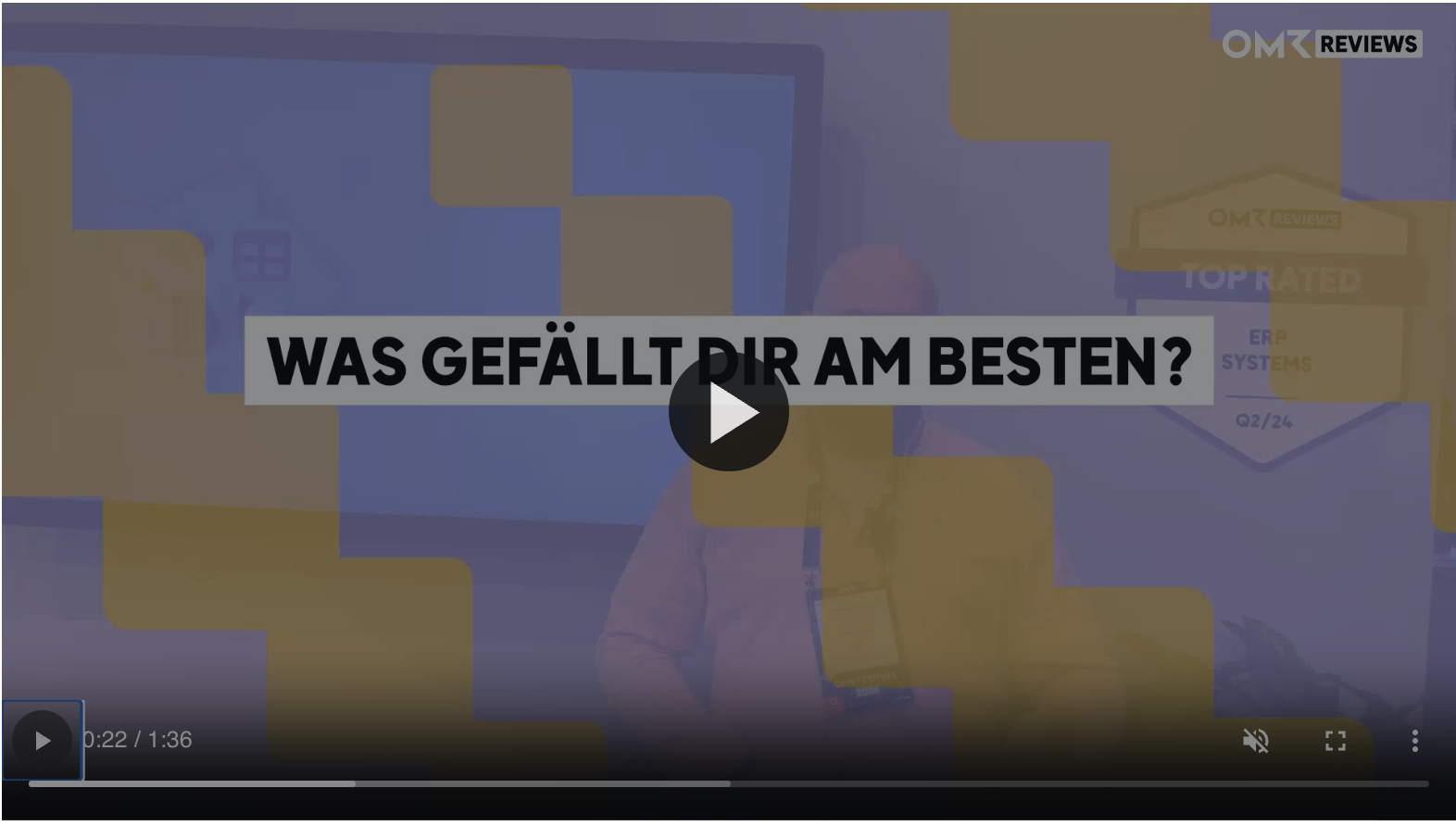
To ensure your video review meets OMR Reviews quality standards and can be published without any issues, please follow these guiding questions. These questions are designed to generate valuable, authentic feedback. We also use these guiding questions to structure video reviews and integrate them as overlays so they appear on screen.
Guiding Questions for Video Reviews: How to interview your customers the right way
-
What do you like best about our product?
-
What don't you like as much about our product? Where do you see room for improvement?
-
Which business problem(s) do you solve with our product?
-
What would you advise others who are considering our product?
 -1)
-1)
Use the following materials for recording video reviews:
👉 Consent Form for Video Reviews (German)
👉 Consent Form for Video Reviews (English)
👉 Briefing & Guiding Questions for Video Reviews (German)
👉 Briefing & Guiding Questions for Video Reviews (English)
3. Send the video file(s) to us
After you've recorded your video review, please send the raw files along with the signed consent form to cs-reviews@omr.com.
Our support team will handle the video editing, add overlays and review questions, and optimize how your video review looks.
If you want to approve the video before publication, just let us know in your email. In that case, we'll send you the final version for review. Without a corresponding note, we'll publish the video directly on your product profile.
The right strategy for your video reviews
Before you turn on the camera, think through a clear strategy.
Focus on added value
-
Identify your "super fans"
Which customers are particularly enthusiastic about your software? Who has achieved the biggest wins? These customers are ideal candidates for video reviews. -
Focus on specific use cases
Encourage your customers to share their hands-on usage experiences. This makes the videos more tangible and relevant. -
Allow for emotion
Encourage your customers to speak honestly and passionately about their experiences. Authentic emotions always work well.
Use recording opportunities
-
Customer Events
Use conferences, workshops, or partner meetings to conduct short video interviews on-site. The mood is often relaxed and people are willing to participate. -
Online Interviews
Schedule short video calls with customers. Make sure there's a stable internet connection and a quiet environment for participants. -
"Success Story" Interviews
When you're already conducting interviews for written success stories, ask whether a short video excerpt is possible.
Tips for recording your video reviews
Even though we handle the editing for you, you can significantly improve the quality of your video review with a few simple tricks.
🎙️ Good audio quality
Pay special attention to good audio quality. Use an external microphone if possible. Make sure the environment is quiet and there are no distracting background noises.
💡 Good lighting
Pay special attention to sufficient lighting with soft light, ideally from the front. Avoid backlighting or direct, harsh light. Use a tripod or place the camera on a stable surface to avoid shaking. This is crucial for a professional impression.
🖼️ Optimal background
Choose a quiet background where your branding or product name is subtly and clearly placed. This strengthens brand recognition.
📹 Camera perspective
Whether sitting or standing, always position the camera at eye level. This creates a straight, natural eye contact that looks professional and relaxed at the same time. Also make sure the person is centered in the frame and there's enough distance to the background.
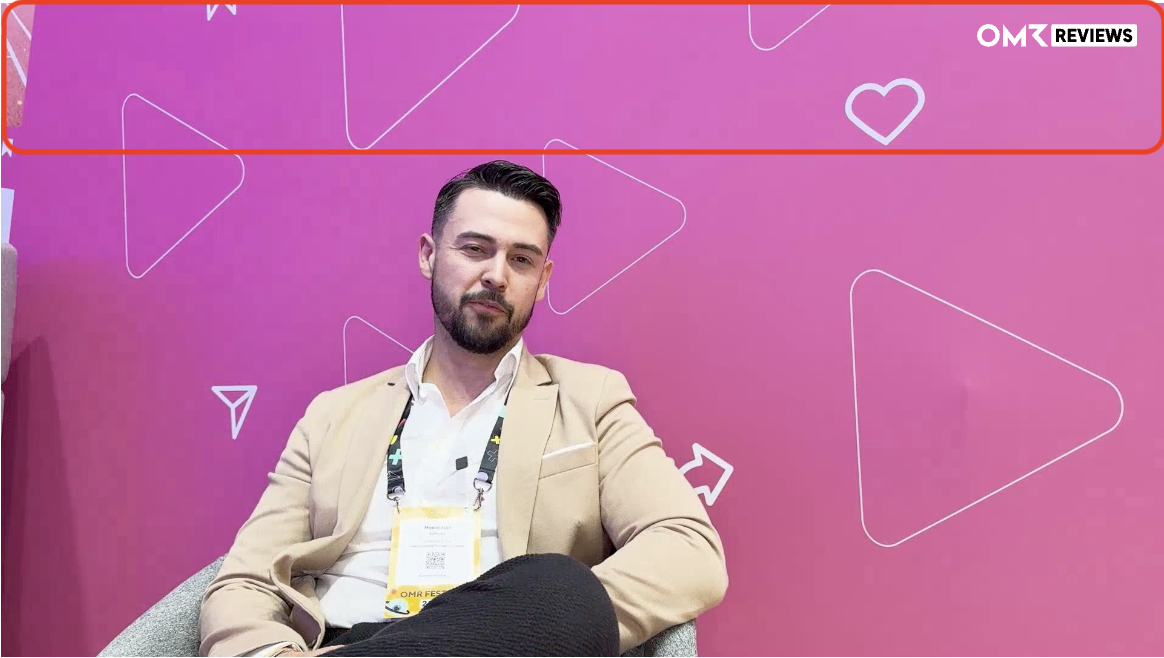
📹 Record in landscape format
Please always film video reviews in landscape format. This leaves enough space for your brand logo in the background as well as for our question overlays. Also make sure to leave space in the upper third, as we'll place the OMR Reviews logo there during video editing.
 -1)
-1)
🎬 Record in sequences
It's best to record the video review in individual sequences per question. This looks more professional, makes corrections easier for major flubs, and makes editing much simpler.
☑️ Our guidelines
Make sure to follow our video review briefing. This ensures your recordings meet our quality standards and guidelines, which makes subsequent editing and publication much easier.
Tips for conducting interviews
🗣️ Ask open-ended questions
Follow our required review questions in your interview:
-
What do you like best about our product?
-
What don't you like as much about our product? Where do you see room for improvement?
-
Which business problem(s) do you solve with our product?
-
What would you advise others who are considering our product?
🌟 Promote authenticity
Create a relaxed, comfortable atmosphere and have fun conducting the interview. Let the person be natural - perfection isn't necessary! Small slip-ups or spontaneous moments make the video more human and credible.
What happens after recording
Once you've sent your video files and consent form to our support team (cs-reviews@omr.com), we take care of the rest:
🔍 Quality check
We verify that the interview and video review comply with our guidelines.
✂️ Video editing
We edit the video, add overlays and review questions, and optimize the presentation.
🟢 Publication (with or without approval)
We publish your video review on your product profile and on the OMR Reviews YouTube channel. This happens either immediately or only after your approval, depending on whether you let us know when sending the files that we shouldn't publish without your consent.
Video reviews appear at the top of your product profile and also on the OMR Reviews YouTube channel (youtube.com/@omrreviews). This way you reach potential customers in two places.
💡 Good to know:
-
Video reviews always appear at the very top above text reviews.
-
They count like text reviews in the respective quarter and thus contribute to achieving OMR Reviews badges.
Still have questions? We're here to help!
If you have any other questions or concerns, please feel free to contact our support team directly via email at cs-reviews@omr.com.
 Powered by happysupport.ai