
OMR Reviews Survey Links
Create incentivized survey links in OMR Manager to direct customers to your review survey in German or English with automatic voucher distribution
Everything you need to know about incentivized and non-incentivized invitation links to your review survey
Here's what you'll find in this article 👇
-
OMR Reviews survey links explained
-
Incentivized and non-incentivized survey links explained
-
How to create your survey links
-
How to use incentivized and non-incentivized survey links effectively
-
How to share your survey links properly
OMR survey links explained
Survey links are special URLs that direct your customers straight to your dedicated OMR Reviews review survey. OMR Reviews accepts both German and English language reviews. That's why you can create survey links in the OMR Manager that direct customers to the specific language version of your survey.
Incentivized and non-incentivized survey links
Your OMR Reviews survey links come in two versions:
-
Incentivized - with an incentive
-
Non-incentivized - without an incentive
Our survey links contain special UTM parameters that clearly indicate whether a review includes an incentive or not. You can create both incentivized and non-incentivized survey links, giving you the flexibility to decide which customers you want to offer an incentive for their review.
Incentivized Survey Links
Incentivized survey links are linked to an incentive of your choice.
Special UTM parameters embedded in the survey links signal to our operations team during review verification that your customers should receive a voucher from us when their review is published. As a neutral service provider, OMR Reviews handles voucher distribution, so you don't have any additional operational effort.
Through the incentivized survey link, your customers are directed to your dedicated OMR Reviews review landing page, where they can see the incentive you've chosen.
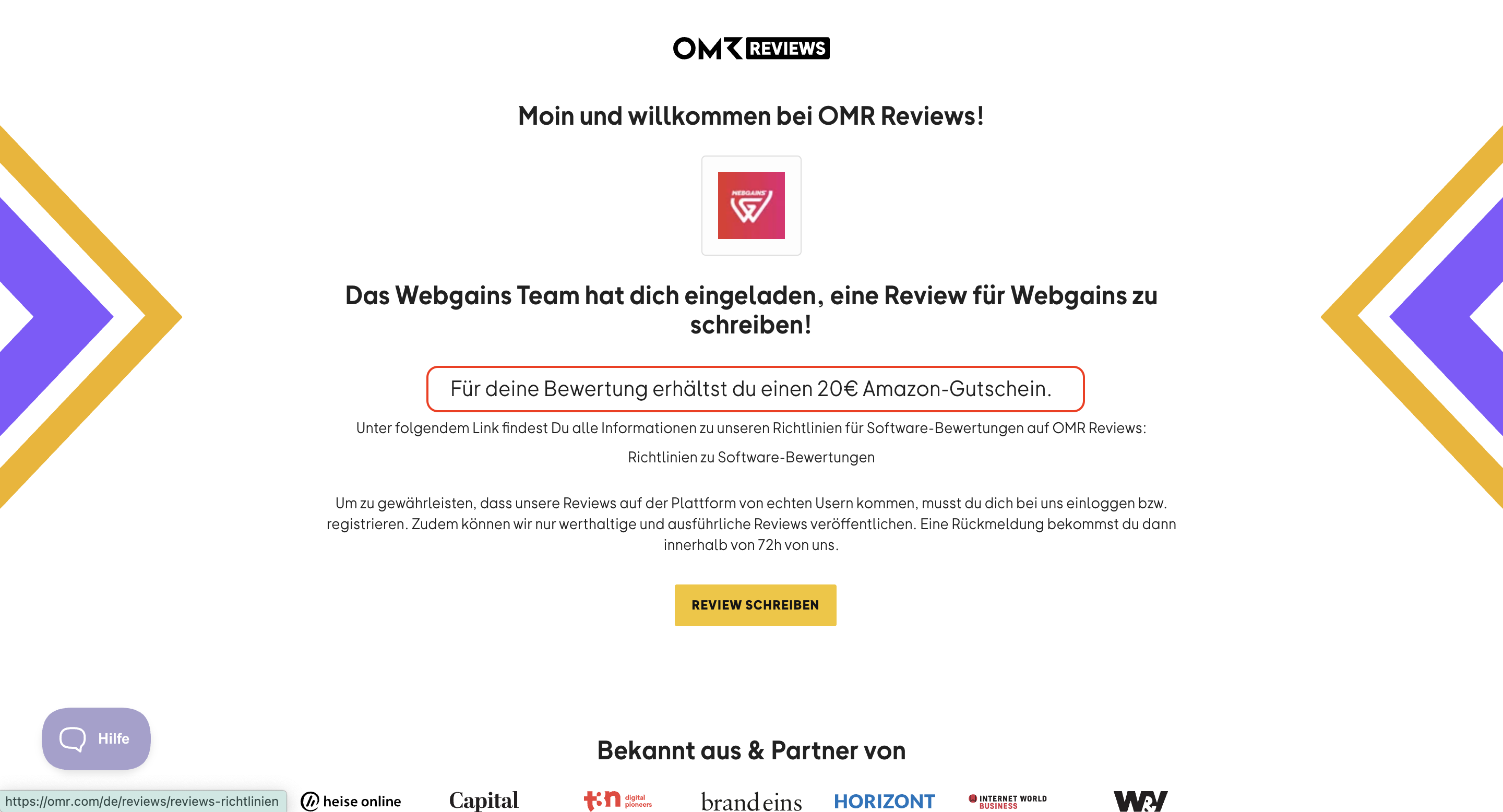
-Apr-14-2025-02-04-20-2558-PM)
The incentivized survey links you create (in German and English) have limitations based on:
-
Available bonus incentive budget depending on your booked package
-
The incentive you've chosen and voucher amount
-
Your package's runtime year or a validity period you've set
You can find more information about bonus incentive budgets and incentives in our article "Bonus Incentive Budget & Incentives".
Here's an example:
💰 Your bonus incentive budget is 800.00 EUR.
🎯 You choose a 20 EUR Amazon voucher as your incentive.
🔗 You receive a German and English language survey link from us that's linked to this incentive.
🎁 Up to 40 customers can receive a voucher from us through the link when their review is published.
💡 Good to know
Once your limit is reached, the incentivized survey links remain active, but no vouchers will be sent after a review is published through these links. Once the limit is reached, a notice will appear on your dedicated review landing page informing your customers that the voucher is no longer available, but they can still submit a review.
The selected voucher is no longer available for this software review. You can proceed with the review, but you won't receive a voucher for the published review.
Non-Incentivized Survey Links
Non-incentivized survey links are not linked to any incentive.
Some customers may not need an incentive to leave a review, and some channels and campaigns may not be suitable for incentivization. That's where non-incentivized survey links come in. When your customers submit a review through this link, no voucher will be sent when the review is published.
Personalized Survey Links
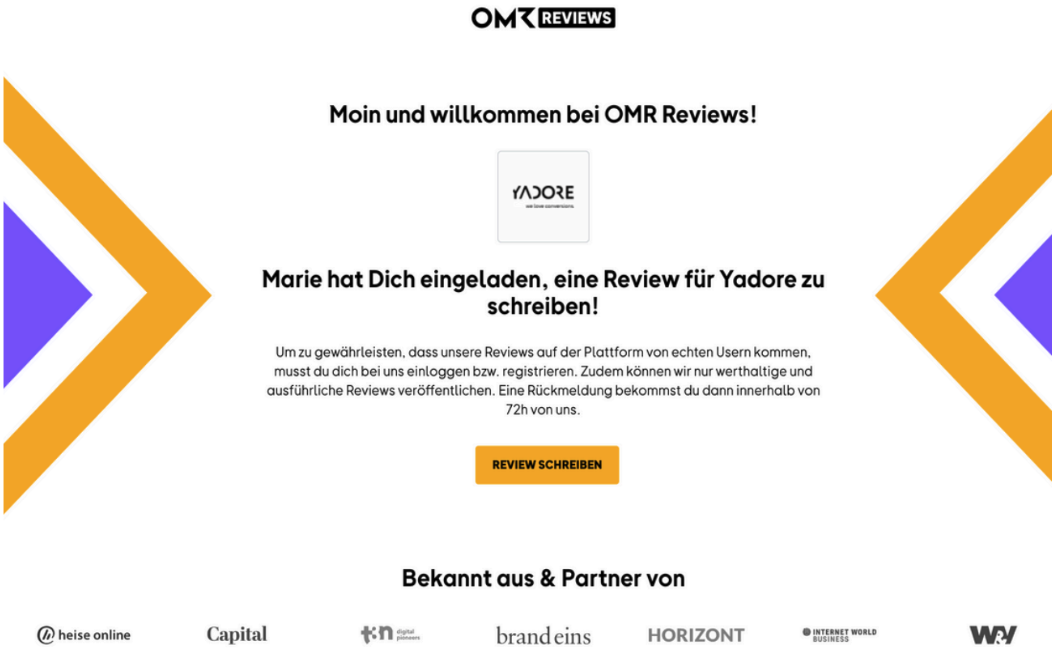
Whether the links are incentivized or not, you can personalize your survey links in the OMR Manager to enable more personal communication on your dedicated OMR Reviews review landing page. You can add the names of teams or individual team members who work directly with customers on review requests. You can create a dedicated link for each employee or team.
-4)
How to create your survey links
To create multiple different survey links, you first need to set up a review campaign in the OMR Manager. Follow this step-by-step guide for instructions on how to create a review campaign in the OMR Manager.
Once your review campaign is created, you'll find all associated survey links at a glance in the detailed view. If needed, you can also easily create additional personalized links here. Just click "Create Link", select your desired language, add your text, and confirm by clicking "Create Link(s)".
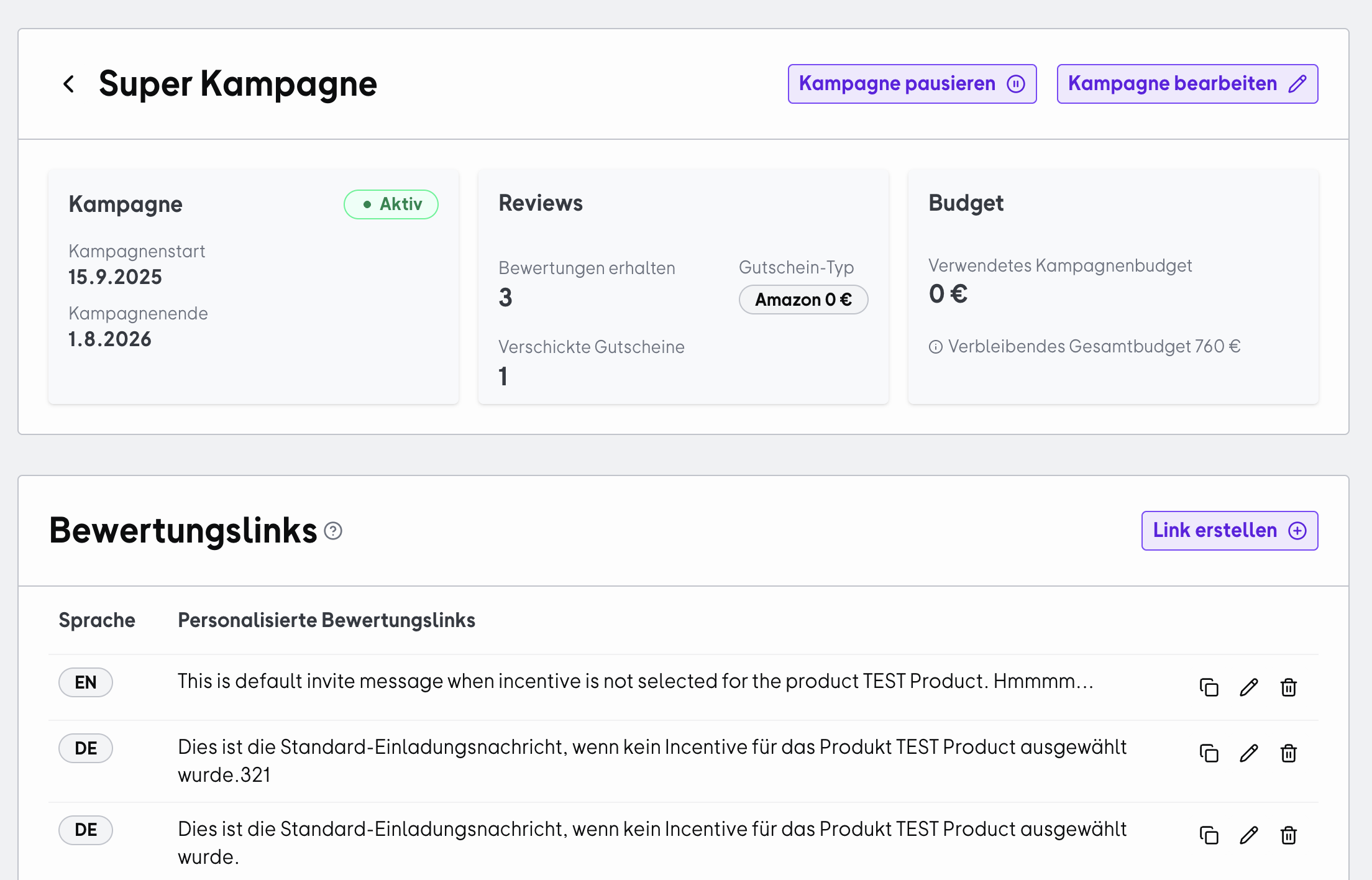
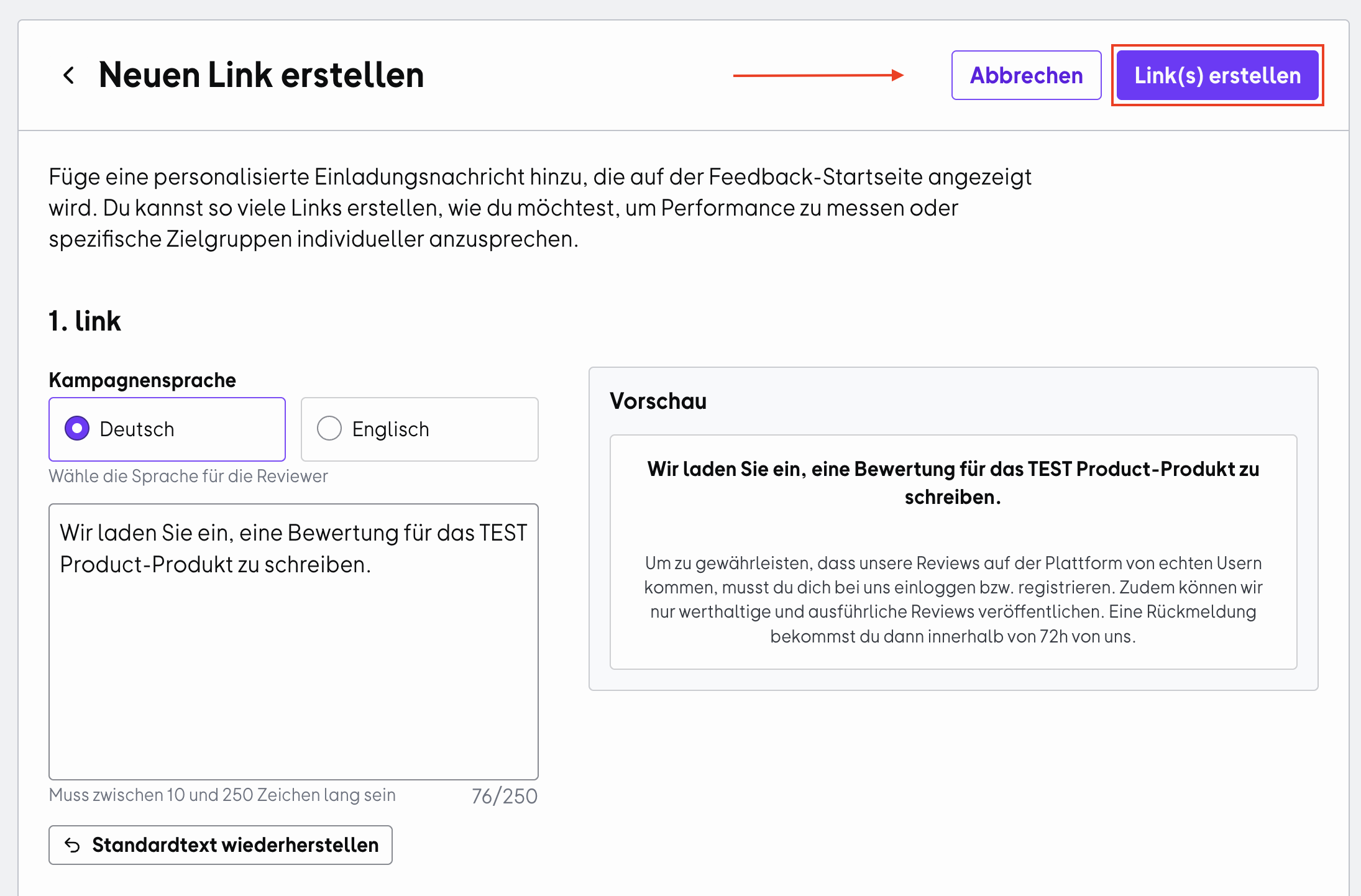
You can also copy, edit, or delete your review links directly from the overview.
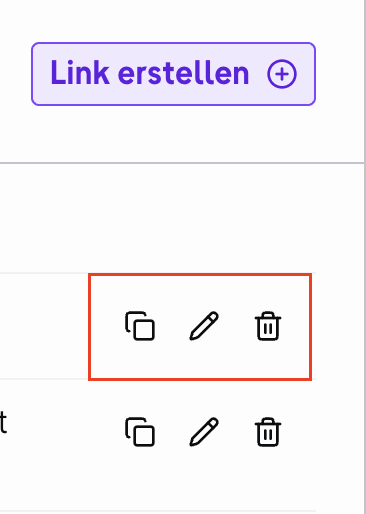
If you delete a survey link, invitations sent through that link will no longer be assigned to the corresponding campaign.
How to use incentivized and non-incentivized survey links effectively
While incentives do increase conversion and participation rates in review surveys, it's smart to strategically choose between incentivized and non-incentivized survey links based on your target audience, timing, channel, and campaign:
Channel
Survey Links
Tips
Personal contact
✔️ Incentivized
✔️ Non-incentivized
In direct customer conversations, you can decide whether an incentive is necessary. Often customers are willing to leave a review even without an incentive.
Email campaigns
✔️ Incentivized
✔️ Non-incentivized
Choose your survey link based on the type of email campaign.
For fixed integrations in regular customer newsletters with high subscriber numbers, a non-incentivized link works well.
For dedicated review emails to segmented audiences, an incentivized link is more suitable.
⚠️ Always think ahead about which customers you want to reach and encourage to leave reviews.
In-product messaging
✔️ Incentivized
✔️ Non-incentivized
In-product messages often reach customers at the right touchpoint - directly when they're using your product.
Depending on your user numbers and engagement levels, you should consider whether an incentivized or non-incentivized link is more appropriate, and potentially do some pre-segmentation.
Social media posts
❌ Incentivized
✔️ Non-incentivized
For organic posts, we recommend using non-incentivized survey links.
Keep in mind that when you integrate incentivized links into organic posts, they're presented to a broader, less segmented audience. This reduces your control over who sees them and increases the risk of receiving reviews from people who aren't actual users of your product.
Social media ads
❌ Incentivized
✔️ Non-incentivized
For paid campaigns, we advise against using incentives.
Incentivized review campaigns through paid ads can appear to be an attempt at manipulation and might encourage customers to leave inflated reviews just to get the reward. This results in less authentic feedback that doesn't reflect the actual user experience and damages trust in your brand.
You'll find helpful tips for your review strategy in our article "Step by Step to a Successful Review Campaign".
How to share your survey links properly
If you want to offer customers an incentive as a small thank you for their feedback and time, make sure you only share the incentivized survey link.
- When sharing survey links internally or externally, make sure they remain complete, as some tools like Slack automatically shorten links. This ensures that voucher distribution to your customers works smoothly after their review is published.
- Always share only the survey links you've created with your customers, both incentivized and non-incentivized invitation links. Avoid directing your customers directly to your OMR Reviews product profile to leave a review.
💡 Good to know:
Your dedicated survey links enable better tracking of your reviews in the OMR Manager and clear assignment to your campaigns and initiatives.
Reviews submitted through your product profile are considered organic reviews. Due to data protection requirements, we can only provide limited information about these reviews in the OMR Manager. With organic reviews, you can only see the published reviews.
In contrast, reviews submitted through your survey links provide you with comprehensive information, including the ability to see reviews in progress and send reminders.
Important notes about sharing your survey links
-
Only share survey links you've created through the OMR Manager with your customers.
-
Don't direct your customers straight to your OMR Reviews product profile to submit reviews.
-
Make sure the links remain complete when shared and aren't shortened.
 Powered by happysupport.ai