
OMR Reviews Survey Links
Create incentivized and non-incentivized OMR Reviews survey links in the OMR Manager to direct customers to your review survey in German or English, with…
What you need to know about incentivized and non-incentivized invitation links for your review survey
Here’s what you’ll find in this article 👇
-
OMR Reviews survey links explained
-
Incentivized and non-incentivized survey links explained
-
How to create your survey links
-
How to use incentivized and non-incentivized survey links correctly
-
How to share your survey links correctly
OMR survey links explained
Survey links are special URLs that take your customers directly to your dedicated OMR Reviews review survey. OMR Reviews accepts reviews in both German and English. That means you can create survey links in the OMR Manager that take customers to the corresponding language version of the survey.
Incentivized and non-incentivized survey links
Your OMR Reviews survey links are available in two versions:
-
Incentivized: with an incentive
-
Non-incentivized: without an incentive
Our survey links contain special UTM parameters that clearly identify whether a review is incentivized or not. You can create both incentivized and non-incentivized survey links, so you can decide which customers you want to offer an incentive for their review.
Incentivized survey links
Incentivized survey links are linked to an incentive of your choice.
Special UTM parameters built into the survey links let our Operations team know, when reviewing submitted reviews, that your customers should receive a voucher from us if their review is published. As a neutral service provider, OMR Reviews handles sending the vouchers, so you don’t have to do any additional work.
When your customers use the incentivized survey link, they’re taken to your dedicated OMR Reviews review landing page, where they’ll see the incentive you selected.
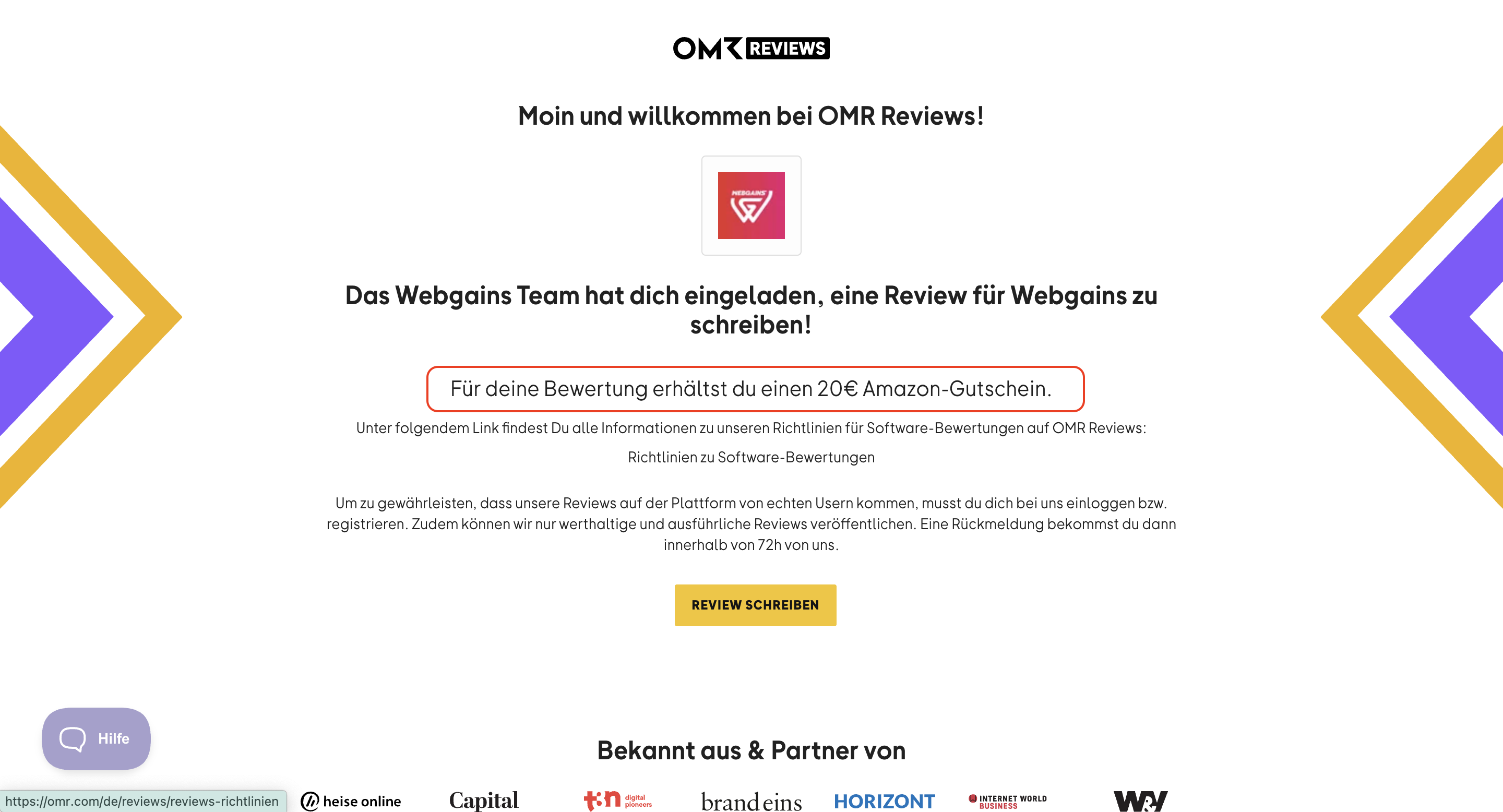
-Apr-14-2025-02-04-20-2558-PM)
The incentivized survey links you create in German and English are subject to the following limits:
-
Available bonus incentive budget, depending on your subscription plan
-
Selected incentive and voucher amount
-
The term of your subscription plan or a validity period you specify
For more information about the bonus incentive budget and incentives, see our article "Bonus Incentive Budget & Incentives".
Example:
💰 Your bonus incentive budget is €800.00.
🎯 You choose a €20 Amazon voucher as your incentive.
🔗 We provide you with a survey link in German and English that’s linked to this incentive.
🎁 Up to 40 customers who use the link will receive a voucher from us when their review is published.
💡 Good to know
Once you reach your limit, your incentivized survey links will remain active, but no more vouchers will be sent for reviews submitted through those links. When the limit is reached, a message will appear on your dedicated review landing page to let your customers know that the voucher is no longer available, but they can still submit a review.
The selected voucher is no longer available for this software review. You can continue with your review, but you won’t receive a voucher if it’s published.
Non-incentivized survey links
Non-incentivized survey links aren’t linked to an incentive.
Some customers may not need an incentive to leave a review, and some channels and campaigns may not be suitable for incentives. That’s where a non-incentivized survey link comes in. If your customers submit a review using this link, no voucher will be sent if the review is published.
Personalized survey links
Whether your links are incentivized or not, you can personalize them in the OMR Manager to make the experience on your dedicated OMR Reviews review landing page more personal. You can include the names of teams or individual team members who communicate directly with customers to request reviews. You can create a dedicated link for each employee or team.
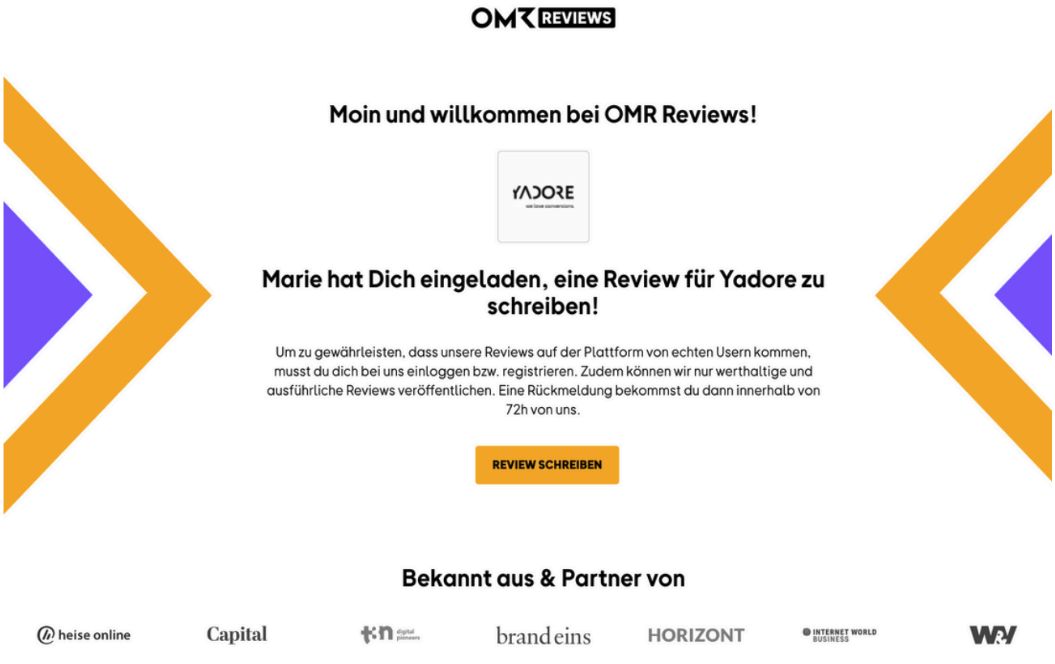
-4)
How to create your survey links
To create multiple survey links, you first need to create a review campaign in the OMR Manager. Follow this step-by-step guide for instructions on how to create a review campaign in the OMR Manager.
Once you’ve created your review campaign, you’ll find all the related survey links in its details view. You can also easily create more personalized links here if you need them: click “Link erstellen”, select the language you want, add your text, and then click “Link(s) erstellen”.
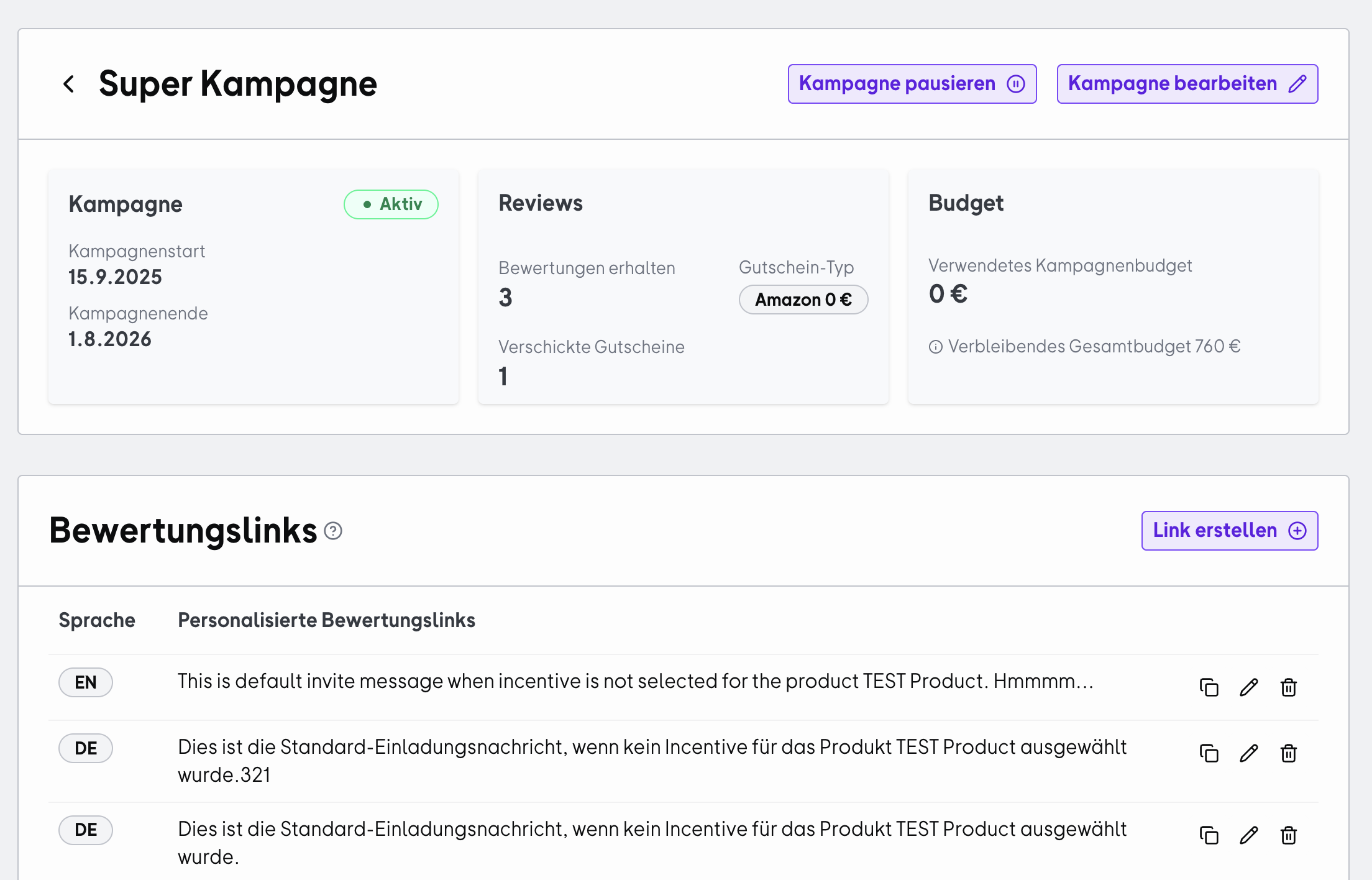
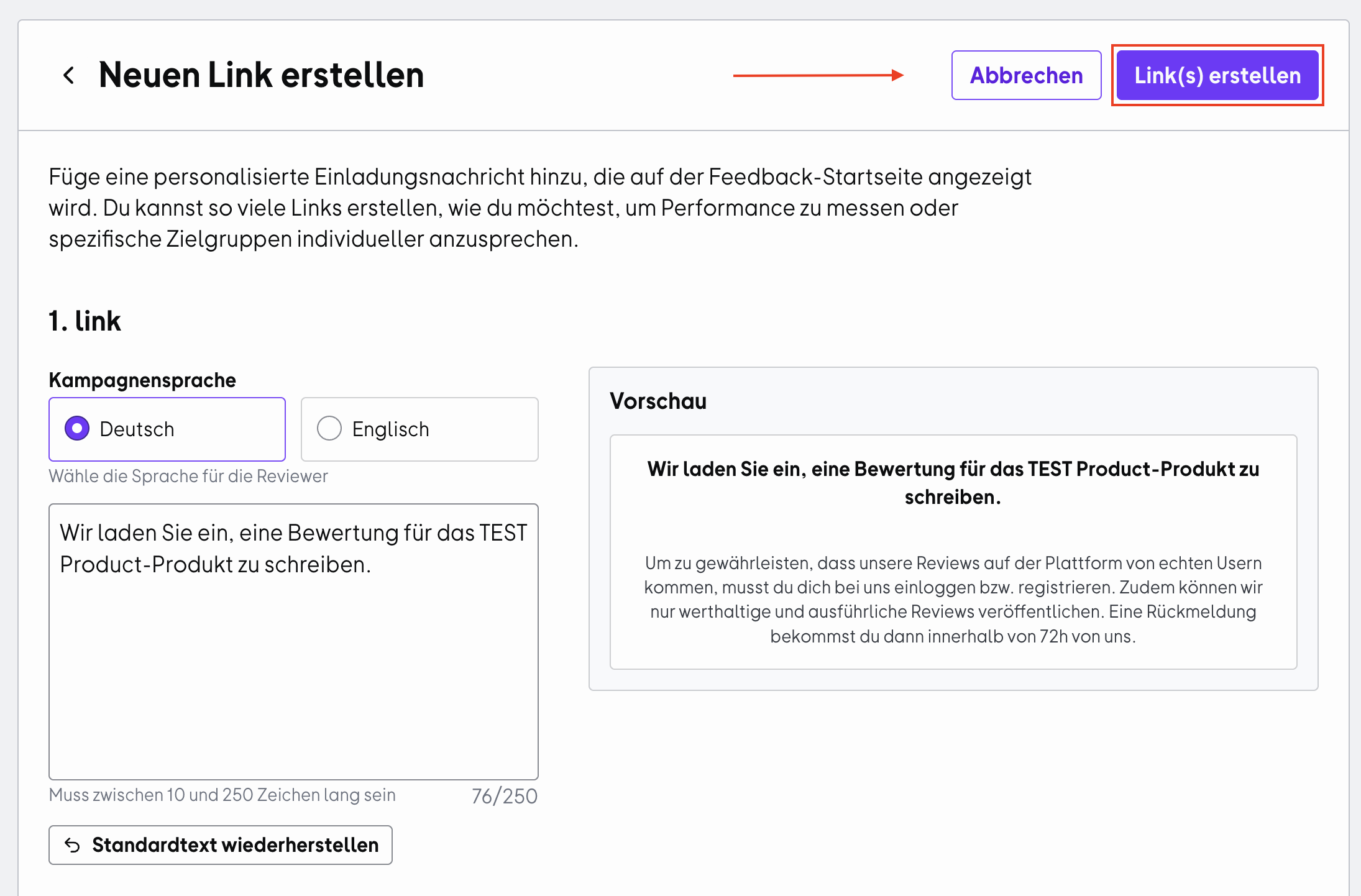
You can also copy, edit, or delete your review links directly from the overview.
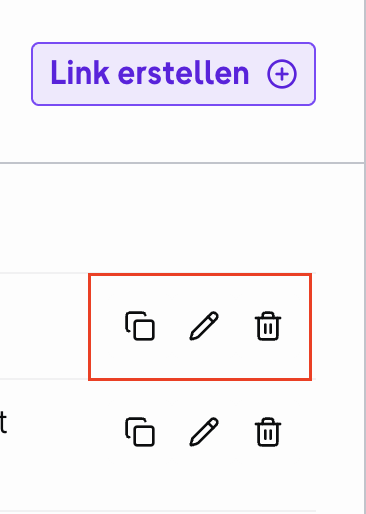
If you delete a survey link, invitations sent using that link will no longer be assigned to the corresponding campaign.
How to use incentivized and non-incentivized survey links correctly
Although incentives can increase conversion and participation rates for review surveys, it’s a good idea to choose whether to use incentivized or non-incentivized survey links based on your target audience, timing, channel, and campaign:
Channel
Survey links
Tips
Personal contact
✔️ Incentivized
✔️ Non-incentivized
When speaking with customers directly, you can decide whether an incentive is necessary. Customers are often willing to leave a review without one.
Email campaigns
✔️ Incentivized
✔️ Non-incentivized
Choose the survey link based on the type of email campaign.
For a regular customer newsletter with a large subscriber base, a non-incentivized link is a good choice.
For dedicated review emails sent to segmented audiences, an incentivized link is a good fit.
⚠️ Always think ahead about which customers you want to reach and encourage to leave a review.
In-product messaging
✔️ Incentivized
✔️ Non-incentivized
In-product messages often reach customers at the right touchpoint, directly while they’re using your product.
Depending on the number of users and their level of engagement, consider whether an incentivized or non-incentivized link is a better fit. You may also want to segment your audience beforehand.
Social media posts
❌ Incentivized
✔️ Non-incentivized
For organic posts, we recommend using non-incentivized survey links.
Keep in mind that adding incentivized links to organic posts exposes them to a broader, less segmented audience. This gives you less control over who sees them and increases the risk of receiving reviews from people who aren’t actual users of your product.
Social media ads
❌ Incentivized
✔️ Non-incentivized
We advise against offering incentives in paid campaigns.
Incentivized review campaigns run through paid ads can give the impression that reviews are being influenced and encourage customers to post overly positive reviews to receive a reward. This leads to less authentic feedback that doesn’t reflect the actual user experience and can undermine trust in your brand.
You’ll find helpful tips for your review strategy in our article "Step by step to a successful review campaign".
How to share your survey links correctly
If you want to offer customers an incentive for their review as a small thank-you for their feedback and time, make sure you share only the incentivized survey link.
- When sharing survey links internally or externally, make sure they remain intact, as some tools, such as Slack, automatically shorten links. This ensures that vouchers are sent to your customers smoothly once their reviews are published.
- Only share the survey links you’ve created with your customers, both incentivized and non-incentivized invitation links. Don’t direct your customers to your OMR Reviews product profile to leave a review.
💡 Good to know:
Your dedicated survey links make it easier to track your reviews in the OMR Manager and clearly attribute them to your campaigns and initiatives.
Reviews submitted through your product profile are considered organic reviews. For data protection reasons, we can provide only limited information about them in the OMR Manager. You can only view the published reviews.
By contrast, for reviews submitted through your survey links, you’ll receive comprehensive information, including the option to view reviews that are still in progress and send reminders.
Important notes on sharing your survey links
-
Share only the survey links you created in the OMR Manager with your customers.
-
Don’t direct your customers to your OMR Reviews product profile to leave a review.
-
Make sure the links remain intact when you share them and aren’t shortened.
 Powered by happysupport.ai