
Best Practice: LinkedIn Outreach
Identify high-intent companies using Buyer Intent Score in OMRviewer and craft personalized outreach based on their OMR Reviews activity
LinkedIn messages that add value instead of just pitching: How to start a real conversation
The Buyer Intent Score in OMRviewer helps you identify companies that are particularly active on OMR Reviews.
A high score tells you: This company is in the middle of their research phase and has already had multiple touchpoints with relevant content, categories, or profiles. That's a strong signal for increased interest in a solution like yours.
Especially if you're new to working with Buyer Intent, it's worth focusing on these high-intent companies. They're usually further along in their decision-making process and more open to an initial conversation.
How to find the right contacts on LinkedIn
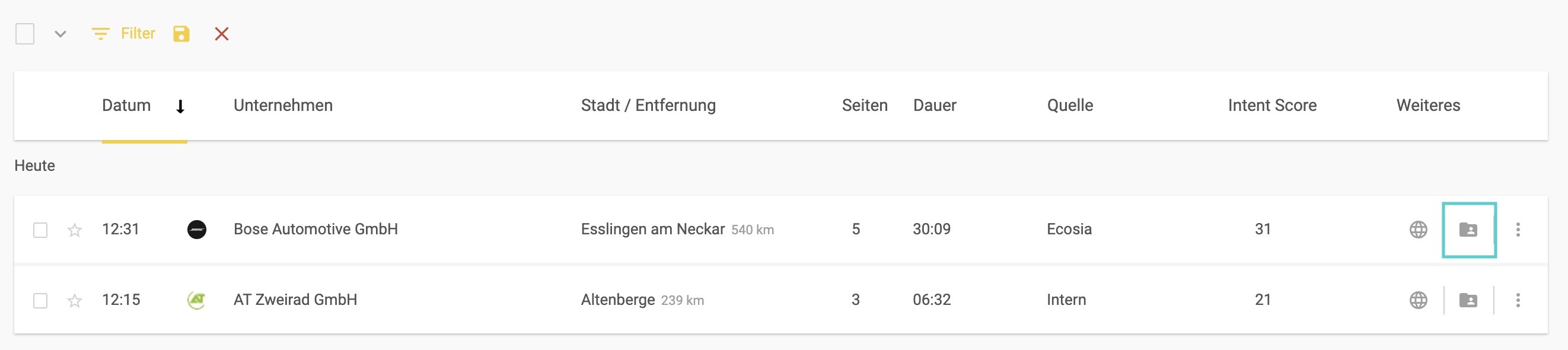
Once you've discovered an interesting company in OMRviewer, you can click directly on the LinkedIn button in the "DatasetPlus" tab. You'll be directed to an overview of LinkedIn profiles of the company's employees.
When searching for the right contact person, it's a good idea to filter the list by roles that are typically involved in decision-making processes.
For example, search for:
-
Marketing
-
Demand Generation
-
Growth
-
Sales
-
CMO, VP, or Head of...
This way you'll quickly find people who either make decisions directly or have a strong influence on the selection process.
Keep in mind: The displayed list often includes former employees too. So make sure you only select people who are currently employed at the company.
How to approach your outreach
Instead of directly addressing prospects about their activity on OMR Reviews, it's often more effective to offer assistance based on content they've consumed on OMR Reviews.
Shape your message based on the person's role and responsibilities, current industry topics, or content related to their intent:
-
The person's role and responsibilities
-
Additional content that matches their OMR Reviews activity (for example, they read a specific article in the ContentHub)
-
Current industry topics or challenges
Rather than jumping straight into a sales pitch, it's often more helpful to assist with their decision-making process through additional content and position yourself as a thought leader.
Examples of a LinkedIn message
Using an AI content creation tool as an example:
**Hi Anna,**
we put together a quick prompt guide internally that shows how marketing teams can get high-quality content results much faster with AI and write entire blog articles, LinkedIn posts, and landing pages in just a few minutes.
Feel free to take a look if you're interested!
Best regards
**[Your Name]**
**Hi Laura,**
we created a short guide that shows how to prepare complex content pieces like case studies or landing pages in half the time using just a few targeted prompts.
Could be interesting for you! Especially if you're working with limited resources and need a lot of content.
Want to check it out?
Best regards
**[Your Name]**
**Hi Markus,**
a lot of B2B teams are currently facing the question of how to meaningfully integrate AI into their existing content strategy without diluting quality.
We've created a practical guide with prompts for this that's especially helpful for quickly creating SEO content and social media posts.
I hope this topic is relevant for you!
Best regards
**[Your Name]**
Bonus: Use additional outreach options
LinkedIn outreach doesn't have to stop at a single message. Especially for high-intent leads, additional formats and tools are worth your time:
-
Sales Navigator for structured outreach sequences
-
Testimonial campaigns with relevant customer testimonials
-
Content sharing directly on LinkedIn or via InMail
-
Custom Audiences for targeted ads based on intent data
This creates a holistic outreach approach that intelligently connects high-intent signals from OMRviewer with your own activities.
 Powered by happysupport.ai